
The platform
The platform underneath the intelligence
Discovery is the visible half. Underneath it, MediaINFO Digital Library is what an institution runs every day: how material is organised, described, viewed, worked with, released and published outward. Six things an archive has to do, and the platform does all six on your own infrastructure.
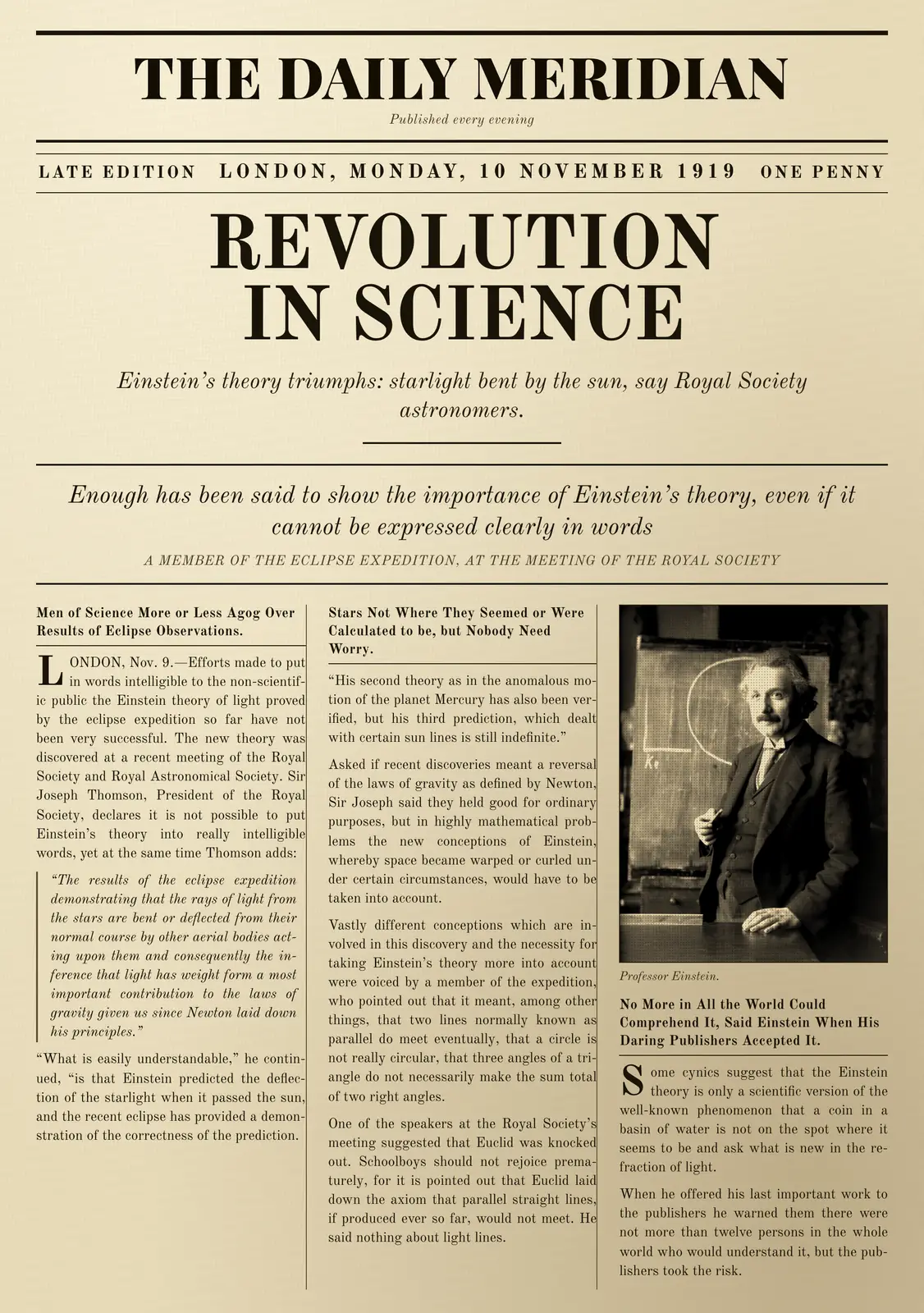
One record laid flat, with six layers rising off it — one for each of the six things the platform does. The record is a front page of 10 November 1919 reporting the eclipse results that confirmed Einstein’s prediction, with a 1921 portrait of Einstein printed in its third column. Organize threads a collection tree in from the left and the page docks into it, filling three field chips: collections and sub-collections, content types, and the fields your cataloguers already use. Enrich outlines the page’s four article zones, boxes the face in the portrait and matches it to a person record, and ticks a transcript under the middle column — every chip it draws flagged as derived. Display dives into the headline until the type is sharp. Interact draws a selection around the report, names it, and slides a second viewer in beside it that pans in step. Reuse peels a download preset off the record — a web copy, with resolution limits and watermarks applied per preset. Share runs a feed line out of the frame toward a partner’s mark and leaves a structured-data chip behind. The six layers then settle into one stack: Organize, Enrich, Display, Interact, Reuse, Share.
Organize
Structure that mirrors the institution, not the software.
- Collections and sub-collections that follow your own arrangement, browsable independently of the search index.
- Content types: named field schemas per class of material, carrying text, number, date, taxonomy and related-item fields you define.
- Bulk import at scale: batch jobs driven by a spreadsheet, with saved blueprints and filename or folder-path variables that title a whole import at once.
- Access scoped per collection (who may view, download and manage each one), with a pre-flight report that previews the impact before you enable it.
- Single sign-on through your own identity provider (SAML and OIDC), and directory integration where it is deployed.
- Auto-login for reading-room terminals: visitors from listed addresses are signed in as a chosen account. Pair it with a read-only one.
Item record
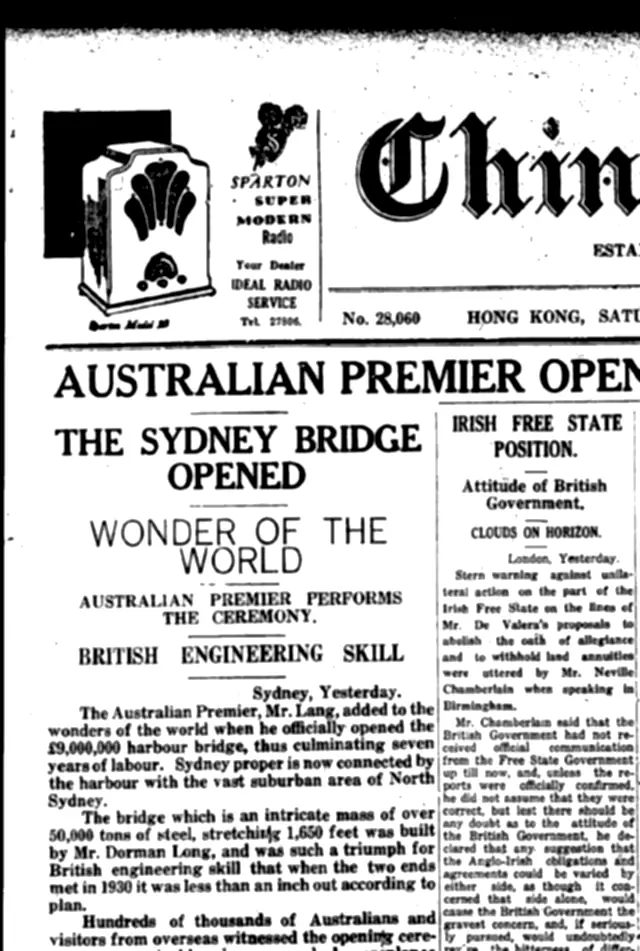
- Content type
- Newspaper page
- Collection
- Newspapers → 1932 → March
- Date
- 19 March 1932 Gregorian · Hijri
- Language
- English
- Access
- Public · download by preset
- Original
- Retained as received
The fields are yours: each content type carries the schema your cataloguers already use.
Enrich
Understanding added on top of the object — and marked as added.
- Text recognition of a class of its own: printed or handwritten, in left-to-right and right-to-left scripts, from newspapers and books to catalogue cards, forms and manuscripts, reading the kinds of material archives actually hold, and handing back every word with its position, so a search is highlighted where it occurs and a paragraph can be selected off the image.
- Latin scripts, including historical blackletter, and Arabic, printed or handwritten and in both reading directions. Where a collection's script or hand is not yet covered, the recognition can be taught it and the coverage added to an existing installation.
- Layout analysis that reads a page into its articles (headings, text blocks, bylines, captions and pictures grouped into stories), each carrying the order a reader reads it in, in either direction, so a newspaper arrives as its articles and Arabic extracts as written; the newspaper's name, issue date and issue number are read off the masthead and dateline too, in Hijri or Gregorian with the other calendar's date worked out beside it, so a bulk of scanned issues files itself; an enhanced article pass is available when enabled.
- Speech transcribed with timings from audio and video, producing searchable captions and subtitles.
- Faces detected and matched to person records; public-people packs, available in certain countries and regions, provide automatic name labelling, with aliases, of thousands of public figures.
- Descriptive tags, captions and scene analysis written back to the asset record and shown as machine-derived.
- Automated translation of extracted text, so one catalogue can be searched and read in more than one language.
- Video indexed by what actually changes on screen, so a recording can be found by a frame in the middle of it; a licensed video analysis adds chapters that cover the whole recording, each titled, summarised and seekable.
- Every result put right by hand in the item editor (pages rotated, inserted, reordered or deleted, a word and its place on the page, a zone, an article, a face), and the workflow re-run on only the pages that changed.
- Processing queued in the background, with schedules that hold heavy work until off-peak hours and usage visible to administrators.
Workflow · newspaper page Queued
- Recognise the text on every pageFull text, searchable and selectable on the page itself
- Analyse the layoutEach article becomes a segment of its own, with its reading order; the newspaper's name and issue date read off the page
- Enrich each articleA title, a summary, the author from its byline, named entities and tags, written back and shown as machine-derived (when licensed)
- Detect and recognise facesNamed automatically where public-people packs are available in your country and licensed; otherwise named by your own team, and those names stay private to your collection
- Describe and tag the picturesA caption and tags, written back and shown as machine-derived
- Flag duplicates and copied textEvery picture and every text checked against the archive for duplicates and copied passages (when enabled)
- Translate the extracted textOne or more target languages, kept beside the original
Administrators assemble the steps a content type needs, and re-run them on a single page when something changes. Steps illustrative.
Display
One viewer for every kind of material in the collection.
- Deep zoom on high-resolution images and scanned pages, down to the detail of maps, manuscripts and large-format scans, served from a built-in image API, with no pre-tiled derivatives to generate first.
- An item of thousands of pages has every page on screen in seconds: 2,350 pages in 2.3 seconds, a hundred times faster than the previous generation, with a hundredth of the data.
- Images, video, audio, documents and 3D models open in the same viewer, with the metadata panel beside them.
- Faceted navigation by format, date, content type, collection and any custom field your administrators mark as facetable.
- A date timeline for ranged filtering, and keyword highlighting that shows exactly where a query matched.
- Interface and catalogue in multiple languages, right-to-left where the material calls for it.
- The interface language and its translations are set per installation; language packs are managed in the admin panel.
- Dates entered, displayed, searched and filtered in both Hijri and Gregorian calendars, per user.
- Magazine 40 · 127 frames
- AS11-40-5903
- Buzz Aldrin · person record
- Neil Armstrong, reflected
The canvas is worked with the keyboard once it is held: the arrow keys move across it, plus and minus zoom, Home returns to the whole mission, and Escape — or the Release control — lets the page go on.
The 1,406 photographs of the Apollo 11 mission, July 1969, laid out in film-magazine order on one square canvas 38 frames across. The chapter descends from the whole mission into magazine 40 — the 127 frames of the surface walk — then into the frame AS11-40-5903, Buzz Aldrin standing beside the lunar module, and finally into his visor, where Neil Armstrong and the module are reflected. Four further frames are drawn at close range: AS11-40-5875, AS11-40-5878, AS11-40-5886 and AS11-44-6552. Every photograph is a NASA original in the public domain.
Interact
Material you can work with, not only look at.
- Two or more items side by side, each panel an independent viewer, with a sync toggle that links panning and zooming.
- Rectangular selections drawn on the canvas — named, listed, focused, shared or downloaded — alongside the editor's annotation tools.
- Extracted text overlaid as selectable regions: hover to read a zone, click to copy it.
- A translation overlay that swaps a page into another language while keeping its layout intact, and never replaces the original.
- Click-to-zoom that flies to the article, shot or page you clicked and switches the sidebar to what is known about it.
- More like this from any result, any photograph, region or article, with a score for each match and the filters still working inside the neighbours.
- Find duplicates inside whatever you have searched and compare them side by side before you decide: the same file imported twice needs no AI; rescans, crops and copies of a picture at the strictness you choose; and copied passages between documents, marked on both (plagiarism review of a submitted thesis, or which title ran a story first), available when enabled for an installation.
- Keyboard navigation in the viewer, for people who are in the archive all day.
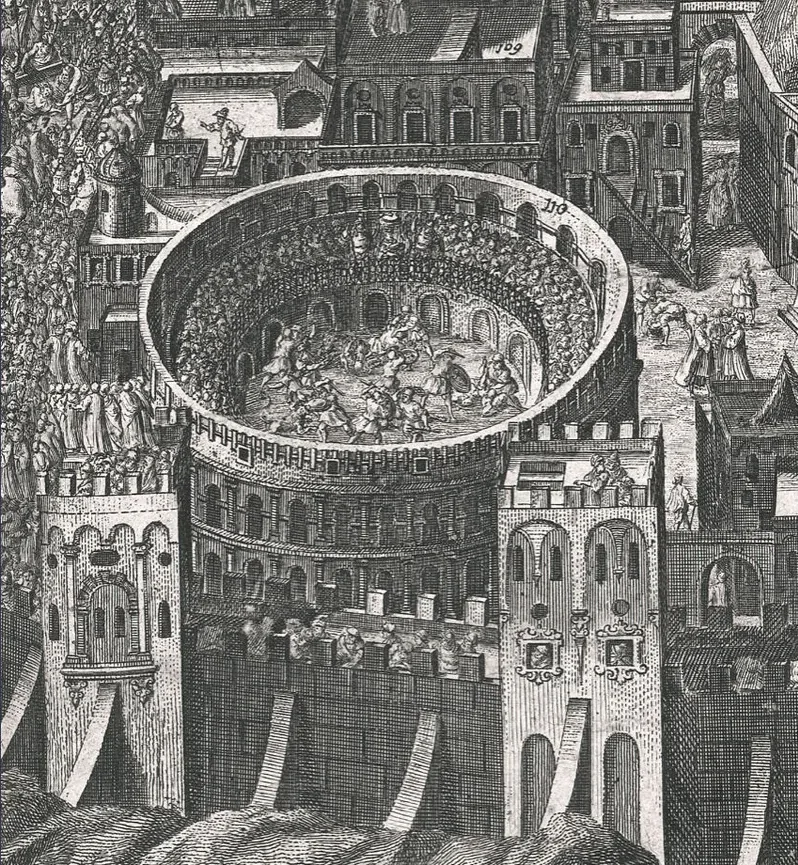
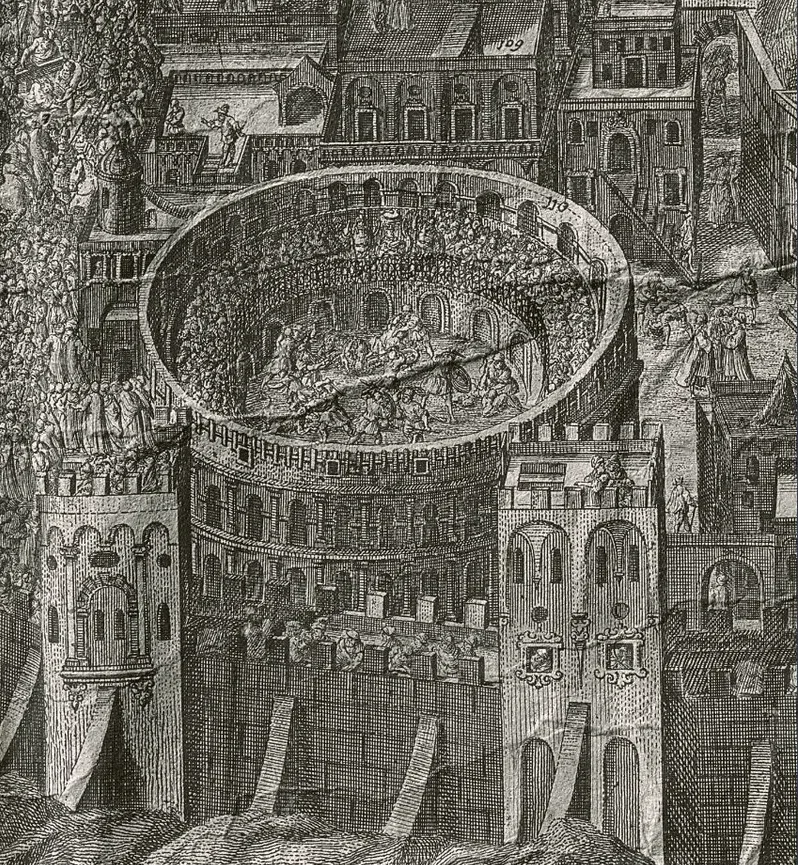
The same detail of an engraved map, scanned twice — under raking light, which shows the relief and condition of the sheet, and under flat light, which brings out the printed line. Drag the divider;Slide the divider; with Sync on, the two panes pan together.
Reuse
The material leaves in the form the work needs.
- Download presets defined by your administrators: the original file, a web-optimised preview, or a custom preset per content type.
- Format, resolution, watermark and licensing conditions set per preset, with watermarks applied to derivatives on download.
- Saved searches that store a query and its filters together, personal to each account.
- Pages of your own: stories and alternative browse pages, built from the platform's own blocks.
- Composites and word clouds assembled from an item's own pages and text.
- Citations attached to assets and managed centrally.
Download
- OriginalArchival master, as received · staff only
- Web copyLong edge limited · watermark applied at render time
- Study PDFSelected pages · licence terms carried with the file
Administrators decide what may leave and under what terms; the reader only sees the presets published for that content type.
Item editor
Every part of an item, put right by hand
Whatever processing produced, the item editor is where an archive corrects and completes it, on every scanned or photographed item: newspapers, books, manuscripts, letters, documents, maps and photographs. The pages, the zones on them, every recognised word, the articles and the faces, in one place.
- Pages deleted, inserted, rotated and reordered, and processing re-run on only the pages you touched; a rotated page turns its zones and words with it.
- Zones drawn on the page and reshaped as a rectangle or point by point as a polygon, to follow a column, a round picture or a slanting line of handwriting; then retyped, described and tagged in every content language, merged or deleted.
- Every recognised word, printed or handwritten, corrected in its text and in its box on the page, and split, joined, added or deleted. Saving the zone re-indexes the item, so the corrected word is what search finds and highlights, where it stands.
- Articles, chapters and advertisements built and corrected: which zones each one holds, the role each zone plays, the order they are read in, and the metadata in every content language.
- Faces assigned to a person, or to a new person made from the face; a wrong name changed, or marked as not this person, and recognition learns from the correction.
- Every zone keeps the versions it replaced, newest first; restoring one brings it back as a change to review, and nothing is overwritten.
- Recognition, tagging, description, face detection and recognition, or layout analysis run again on any region from inside the editor, the result held for review before anything is saved, when licensed.
The item editor, on a manuscript page
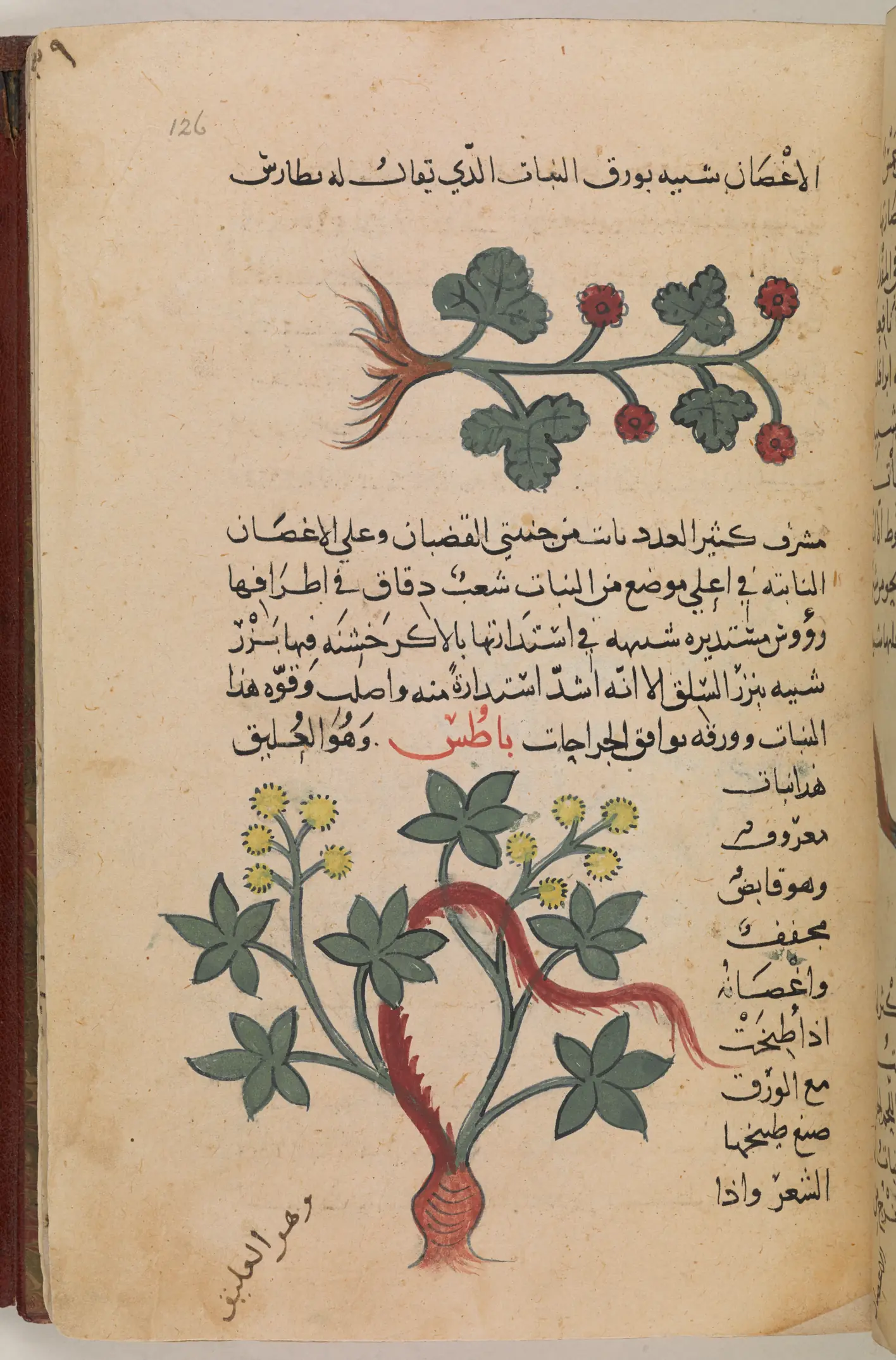
Drag the page to move it; click a zone to select it.Drag the page to move it, pinch to zoom, and tap a zone to select it. With the page held, the arrow keys pan, plus and minus zoom, Home returns to the whole page and Escape lets it go.
Zones 7 on this page
Select a zone on the page or in this list to see its type, its description and its text.
Correct a word Text block 6
The narrow column is a Text zone, and each of its words is a box on the page. Line 14 reads صنع طٮيخها. The dots fall as صنع; the sense, 'its decoction dyes the hair', needs صبغ.
In the word's box: Enter finishes the word and Escape abandons the typing. A word you have changed is tinted.
Textual results · line 14
صنعصبغطٮيخها
Removed in red, added in green.
Saved. The item is re-indexed: a search for صبغ now finds this page, and the word is lit where it stands.
Reshape a zone Margin note 7
The margin note was drawn as a new zone, an upright box, and takes in paper the note never touches. As a polygon every point has its own handle: move the four points to follow the slant of the hand.
Drag a point, or select it and move it with the arrow keys; Shift moves it further.Drag a point with a finger. Points stay on the page, and a point that would make the outline cross itself is refused.
Saved: the zone follows the hand, and the outline it replaced is kept as an earlier version.
Build a segment article
A segment holds the zones of one unit. Here it is the bramble's entry: its rubricated heading, its painting and its text, each in its role, in the order they are read.
ClickTap a zone on the page to add it or take it out, or use the list:
- 14 · Headingtitle
- 25 · Pictureimage
- 36 · Text blocktext
Titleباطُس. وَهُوَ العُليق
Taken from the text of its first zone, which plays the title role.
Saved. The entry reaches search at the item's next re-index, which saving any of its zones starts.
On this page
- Line 14: صنع corrected to صبغ, saved
- The margin note's outline fitted to the hand, saved
- The bramble's entry built as one segment, saved
A working demonstration of the item editor on a manuscript page, its lines and text in place as a recognised page has them; here they are the British Library's own transcription. The editor works the same way on every page of every kind of item. Dioscorides, Materia medica, copied in Baghdad in 735 AH (1334); British Library, Or 3366, f. 126r (public domain).
Page builder
Your own pages, from the platform's own parts
The home page every installation starts with is itself put together from blocks: a search box, filters, a timeline and the results. The same blocks build any page an institution wants, and nobody writes code.
- Stories told from the collection: a hero picture and title, your curators' text, chosen items and images, a row of related items, and a map with the places marked where the installation is online.
- Alternative search and browse pages: one collection or one content type with its own filters, timeline or calendar, sort orders and result layouts.
- Entry points where readers need them: a search box that sends them to a browse page, a hand-picked selection that stays as chosen, their own saved searches, and conversational search placed where you want it, when licensed.
- A page stays with your editors until it is published, any published page can become the home page, and every page takes its look from your theme.
Page · The Bridge opens Draft
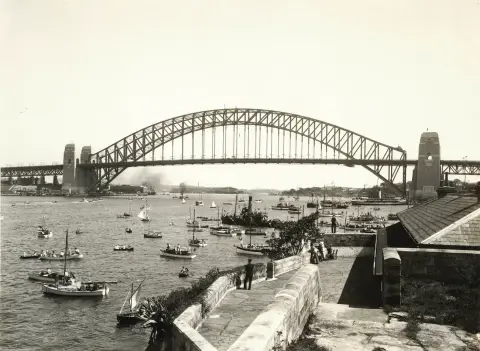
The Bridge opens
Sydney, 19 March 1932
Opening day
- Photograph
- Newspaper
- Chart
- The China Mail
- The official dais
- Chart No. 1069

Integrate and migrate
Everything the platform does is reachable over its HTTP APIs (library, search, assets, processing, access and system), and an interactive reference comes with the licence.
Bulk import is designed for migrating large existing collections or automating regular ingest from external systems, so a catalogue export or a nightly delivery arrives the same way a single upload does.
Collections that arrive with their text and structure already produced (METS/ALTO packages, with or without a BagIt wrapper) come in with both kept rather than recomputed, and the repository's storage can be moved later with a dry run and a verified copy.
Outward, the same record is harvested over OAI-PMH in Dublin Core and EDM and its images served through the IIIF Image API, so aggregators and partner sites read your records and render your images in their own systems.
Formats
50+ file formats, including RAW camera formats and GLB 3D models.
Handled natively across six media categories, with technical metadata (dimensions, duration, codec, colour profile) read on ingest. For preservation-grade holdings, lossless JPEG 2000 and retention of the original source file alongside every derivative.
- ImagesJPEG, JPEG 2000, PNG, TIFF, BMP, GIF, WebP, HEIC, AVIF, JPEG XL, SVG and RAW camera formats
- VideoMP4, MOV, AVI, MKV, WebM, WMV, MPEG, MXF, transport streams and more
- AudioWAV, FLAC, MP3, AAC, OPUS, AIFF, OGG and more
- DocumentsPDF, DOCX, PPTX, XLSX and the OpenDocument and iWork families
- 3D modelsGLB
- PackagesBagIt archives, and OCR interchange in ALTO and METS/ALTO
Deployment
Runs where your archive lives.
On your own infrastructure, on your own terms, including with no way out to the network at all. Storage on a local filesystem, on object storage, or on a network share, with more than one backend active at once.
Runs on your infrastructure
The platform is installed on your own servers, in your own data centre or private cloud. Your material, your metadata and your users stay inside your perimeter.
- A guided installation onto hardware you control
- Roles, permissions and audit under your administrators
- Standards out: harvesting over OAI-PMH in Dublin Core and Europeana metadata, standard image delivery, structured data on public pages
Air-gapped when it must be
An installation can be run with no outbound connection at all. The resident agent then never contacts the vendor; releases arrive as signed offline bundles.
- No outbound check-in, by configuration
- Upgrades delivered as offline bundles you carry in
- MIMI Edge, the AI on your own servers, can be confined to a segment with no route out, which your own network monitoring can verify
Upgrades in place, rolls back on its own
Updates are offered, never applied unattended: a release is applied when an administrator asks for it, health-checked, and reverted automatically if it does not prove itself.
- Every stage journalled, from snapshot to commit
- A rollback restores the containers and the configuration
- It does not restore your data: the database, the repository storage and the search index are never reverted by an upgrade, so take your own backup first
See the platform on your own material.
A guided demonstration on our demo server, with a few items from your collection if you wish.